
MockPipeline

MockPipeline

Place assets once, batch-composite image sets.

  • macOS
  • Windows

Put transparent PNG assets on a set of base images that share the same size and layout, arrange them once, and export the whole set of product shots, mockups, or marketing images in one go.

Screenshots

01 / 04
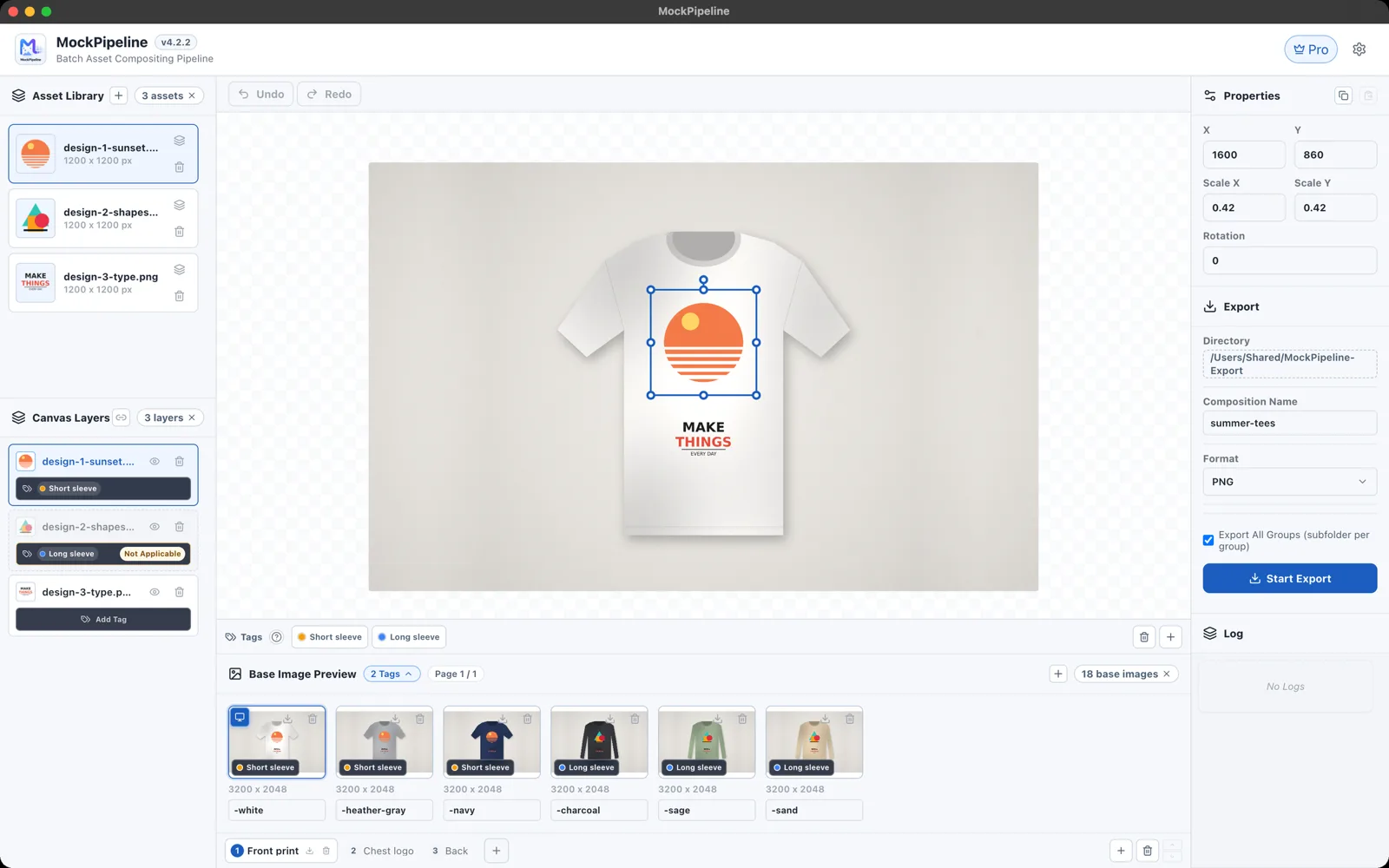
Arrange once, preview on every base image
Click to zoom
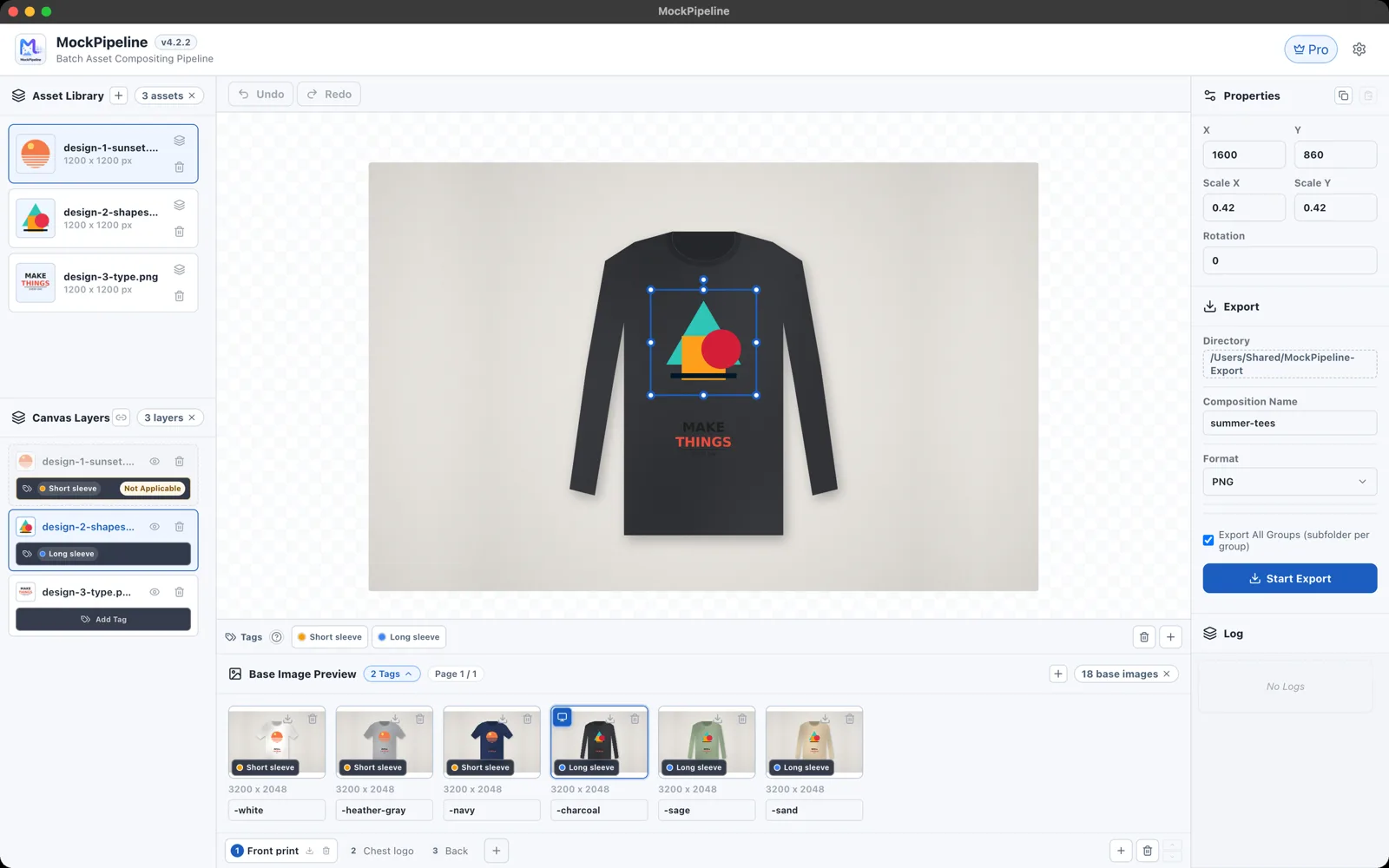
Tag bases and assets to cover every style with one canvas
Click to zoom
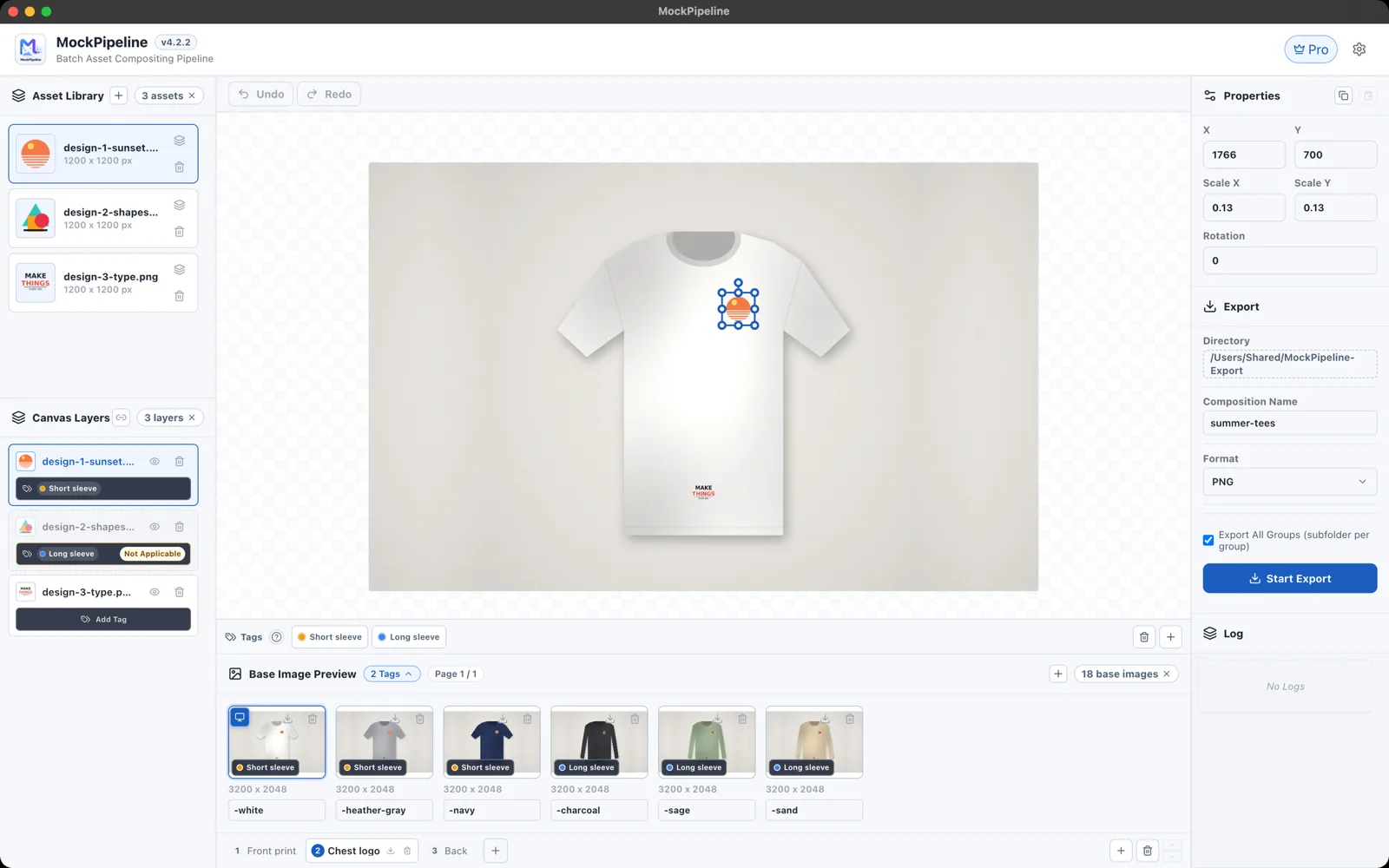
Organize bases in groups, each remembering its own layout
Click to zoom
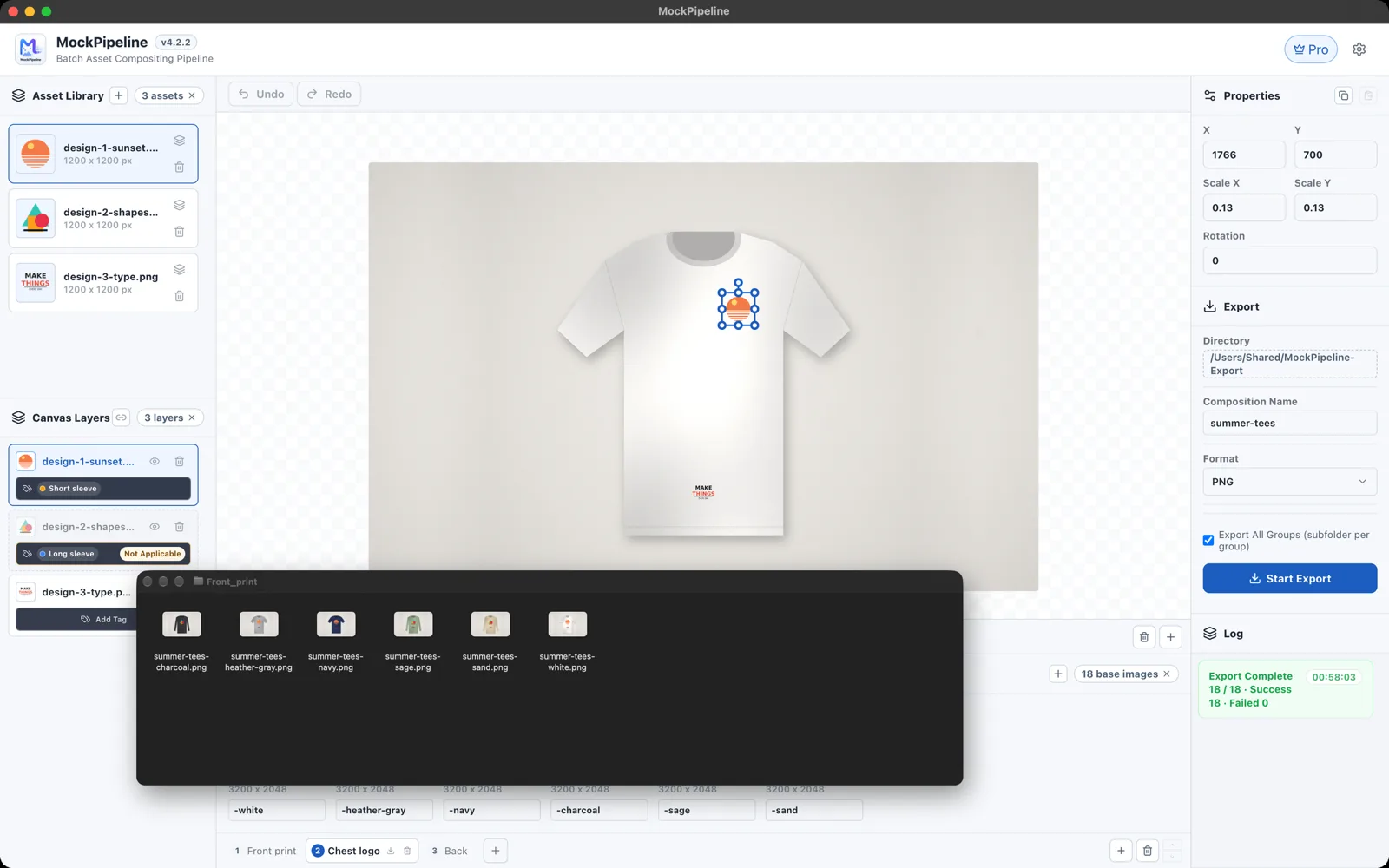
Export full sets in one click, sorted by group
Click to zoom

Arrange once, preview on every base image

Features

  1. 01

    Asset Placement

    Drag transparent PNG assets onto the canvas and preview the result on every base image at once.

  2. 02

    Base-Image Groups

    Organize different styles and angles into groups, each remembering its own placement.

  3. 03

    Rule Tags

    Tag base images and assets so one canvas covers every product variant.

  4. 04

    Batch Export

    Export the full image set in one click, neatly sorted into folders by group.

Download MockPipeline

Latest: v4.2.2 (Under Store Review)

macOS

Windows

💡Notice: MockPipeline is currently under app store review. Public downloads will be available soon.

Release Notes & ChangeLog

v4.2.22026-08-13
Stable Release

Base-Strip layout and canvas preview auto-healing resilience for extreme dimensions.

✨New Features
  • • Base-Strip Layout: side-by-side comparison layout for multi-model setups with content-sized strip formatting
  • • Preview auto-healing resilience: decoupled base-image and print asset loading so corrupted prints never blank canvas previews
⚡Improvements
  • • Removed partial-load banners for an unobstructed canvas view
  • • Polished asset list padding and content-sized model strip formatting
Released:2026-07 ~ 2026-08
Builds: v4.0.0 ~ v4.2.2(5 tags)
Major Milestone

Rule Tags System, fluent UI motion dynamics, Base-Strip layout, and auto-healing rendering resilience.

✨New Features
  • • Flexible Rule Tags system for multidimensional asset tagging
  • • Tag-based asset matching and batch tagging
  • • Base-Strip side-by-side comparison layout for multi-model setups
  • • Preview rendering self-healing for extreme dimensions
  • • Streamlined pipeline group organization with proactive warnings on dimension mismatches
⚡Improvements
  • • Smooth micro-interactions across the user interface
  • • Automatic renderer crash recovery
  • • Hardened session persistence and auto-recovery
  • • Reserved scrollbar gutters to eliminate jumping
  • • Unified cross-platform typography rendering
🐞Bug Fixes
  • • Fixed sporadic export file index ordering issue
  • • Resolved macOS menu main window restore bug
Released:2026-07
Builds: v3.0.0 ~ v3.0.1(2 tags)
Major Milestone

Preflight export conflict detection and redesigned task log monitoring system.

✨New Features
  • • Preflight collision detection across all export groups prior to batch processing
  • • Dedicated collapsible task log drawer with real-time autoscroll monitoring
  • • Integrated StoreKit Pro licensing system for macOS
⚡Improvements
  • • Redesigned export log layout with smooth expand/collapse controls
  • • Optimized image memory retention across active editing sessions
🐞Bug Fixes
  • • Preserved model group assignments during cross-page navigation
Released:2026-06 ~ 2026-07
Builds: v2.0.0 ~ v2.4.1(10 tags)
Major Milestone

Architecture 2.0 milestone: Model Group tabs, bilingual i18n, Dark Mode, group pagination, and layer-library synchronization.

✨New Features
  • • Group Tabs for organizing multi-model setups
  • • Layer visibility toggle
  • • Export hierarchical directory tree by composition name
  • • Built-in multilingual system with English/Chinese switching
  • • Dark Mode for comfortable long design sessions
  • • CustomSelect and SegmentedToggle components
  • • Group pagination with page-aware keyboard shortcuts
  • • Bidirectional layer-to-library synchronization toggle
  • • Native macOS menu quick access to Settings
⚡Improvements
  • • Built-in image memory cache for instantaneous switching
  • • High-performance thumbnail loading pipeline with lower memory footprint
  • • Compact scrollbar styling
  • • Refined domain terminology
  • • Polished button hover states for higher contrast and legibility
  • • Added cancel button for in-progress downloads
🐞Bug Fixes
  • • Cleaned up orphan transform parameters on group deletion
  • • Ensured globally unique IDs across groups
  • • Enhanced offline activation state reliability
Released:2026-06
Builds: v1.0.0 ~ v1.5.0(14 tags)
Major Milestone

MockPipeline foundation: multi-model asset management, batch rendering engine, and resizable workspace splitters.

✨New Features
  • • Recursive print folder import with automated asset indexing
  • • Visual drag-and-drop layer reordering with a live insertion line
  • • Free multi-layer canvas transformation and live composition preview
  • • High-speed batch export engine
  • • Transform copy/paste for print instances (reusing coordinates, rotation, and scale)
  • • Dedicated Settings center with update controls and support info
  • • Large hover preview popovers for print thumbnails
  • • Unified portal-based TooltipProvider
  • • Persistent real-time export task logs
  • • Resizable workspace splitters for flexible panel layouts
⚡Improvements
  • • Automatically persisted custom workspace dimensions across app restarts
  • • Reorganized right panel headers and unified action button styles
  • • Rendered full uncropped thumbnails in asset libraries and layer lists
  • • Trimmed redundant dependencies and faster startup initialization
  • • Retina high-DPI icons for crisp desktop display
🐞Bug Fixes
  • • Fixed library item overflow with long asset names
  • • Resolved file type filtering inconsistency on single image selection
  • • Fixed potential Windows file picker freeze during batch asset selection
  • • Fixed sporadic errors during Windows installer overwrite or repair routines

Comments

Questions, feedback, or thoughts are welcome here.

Nickname
CAPTCHA
0 / 2000
0 comments
Loading comments…